















Running a paid community on WordPress means managing a lot of moving parts: payments, access control, member onboarding, course delivery, and engagement, all at once.
Until recently, covering all of that meant assembling four or five plugins and getting them to behave like one system. That has changed. BuddyBoss now ships memberships and courses natively, with Stripe built in, so the starting point is one plugin rather than a stack.
Integrations are what you add on top of that, when your business asks for something the built-in version doesn’t cover. This guide to integrations for paid communities starts with what’s already there, then covers which ones to add, what each does, and when it’s worth the extra complexity.
Start With What’s Already Built In
Before adding anything, it’s worth knowing what you already have. BuddyBoss Memberships and Courses is native to the platform, not a third-party integration. (There’s a full walkthrough of what the native add-on includes if you want the detail.)
Memberships give you tiers with recurring billing, and they map to Groups, so you can build a genuine upgrade path rather than a single flat paywall. Page-level access protection lets you restrict any page, including profile pages and the member directory, based on the membership someone holds.
Courses give you lessons, quizzes, and assignments delivered where the community already lives. Memberships have to be set up first, since access needs to exist before a course can sit behind it.
Stripe is the built-in payment gateway, which covers most creators from day one.
On the Launch and Scale plans, BuddyBoss takes nothing from sales made through the native add-on. The entry plan carries a small percentage on that add-on specifically, and the current rate is always on the pricing page. There is never a BuddyBoss fee on sales made through LearnDash, MemberPress, Tutor LMS or any other plugin, on any plan.
For a straightforward setup, sequential courses and a tiered membership, that covers it, and the rest of this guide is optional. You start adding integrations when you hit one of these:
- You need a payment gateway other than Stripe
- You need deeper LMS features: SCORM, cohorts, multi-instructor roles, complex enrolment logic
- You want a product catalogue, coupons, or order bumps around what you sell
- You want member behaviour flowing into a CRM or email platform automatically
- You already run LearnDash, MemberPress or another tool and have no reason to move
Why Integrations for Paid Communities Matter for Growth
Think of integrations as your community’s nervous system. They connect the parts that aren’t already connected.
Time back in your schedule. The global membership management software market was valued at $5.67 billion in 2025. It’s growing because the manual version of this work doesn’t scale: reconciling payments against access by hand is fine at fifty members and impossible at five hundred.
Better member experience. When systems talk to each other, members never hit roadblocks. They buy a course. They instantly get access. They see their progress. They earn badges. Everything happens automatically.
Data that makes sense. Without integrations, your data lives in separate silos: payment info in Stripe, engagement data in your community, email metrics somewhere else. Integrations create one picture instead of three partial ones.
Fewer mistakes. Manual data entry causes errors. When a member upgrades, integrations update everything instantly. Access levels change. Retention emails trigger. Premium content unlocks. No forgotten updates or duplicate charges.
Payment Integrations: When You Need More Than Stripe
Stripe is already built in, so this section is about what you add when Stripe alone isn’t enough.
Key Payment Tools
Stripe is built for recurring billing, which is why it’s the native gateway. It manages subscriptions automatically, retries failed cards, and supports 135+ currencies.
PayPal reports more than 400 million active accounts. Many people prefer it because they don’t need to enter card details, and it’s especially strong for international buyers. Reaching it means adding WooCommerce or MemberPress, since the native add-on runs on Stripe only.
WooCommerce turns WordPress into a complete store. Worth adding if you sell more than memberships and courses, or need coupons, product bundles, and a real catalogue.
What Payment Integrations Do for You
Automate recurring payments. Members subscribe once, and payments process automatically after that. When cards fail, the system retries in the background rather than quietly losing the member. Stripe reports that its Smart Retries recover $9 in revenue for every $1 customers spend on Billing. Failed cards are one of the largest sources of churn that has nothing to do with whether members still want to be there.
Create flexible pricing. Set up multiple tiers, each unlocking different content, groups, or features. Run limited-time promotions, offer annual prepay, or create founding member discounts. The payment layer handles the logic.
Sync access instantly. The moment payment clears, members get access. Forum permissions activate. Course enrolment happens. When subscriptions end or cards decline, access revokes automatically, so your premium content stays protected without constant monitoring.
Keep an Eye on Disputes
Chargebacks matter more than most community owners realise, because the card networks set a ceiling. Visa now measures this through its Acquirer Monitoring Program (VAMP), which replaced its older dispute programs in 2025. The ratio adds fraud reports and disputes together and divides by settled transactions. As of April 2026, a merchant in the US, EU, Canada, Asia-Pacific or Latin America with a ratio of 1.5% or higher and at least 1,500 fraud and dispute reports in a month falls into the Excessive tier, which carries fees. Stripe’s monitoring-programs guide lays out the full thresholds.
Recurring billing is unusually exposed here, because the most common dispute is not fraud: it’s a member who forgot they subscribed. Clear billing descriptors, a renewal reminder before the charge, and an easy self-service cancellation do more to keep your ratio down than any fraud tool. Stripe’s guidance on preventing disputes on cancelled subscriptions recommends exactly this.
CRM Integrations: Strengthen Member Relationships
Payment integrations handle transactions. CRM integrations handle everything else: understanding your members, automating communication, and keeping engagement up between logins.
Top CRM Tools
HubSpot combines contact management, email marketing, automation workflows, and detailed analytics. The free tier works for growing communities; paid plans add advanced features.
ActiveCampaign specialises in marketing automation. Its conditional logic creates sophisticated member journeys based on behaviour triggers.
Kit (formerly ConvertKit) was built for creators, with visual automation builders, subscriber tagging, and landing pages.
What CRM Integrations Accomplish
Track everything members do. Course completions, forum posts, event RSVPs, content downloads. All of it flows into your CRM automatically, building profiles that show engagement patterns and interests.
Automate your communication. New member joins? Send an onboarding sequence that introduces community features, highlights popular content, and encourages first interactions. Member hasn’t logged in for 30 days? Send a re-engagement email featuring what they missed.
Segment your audience. Divide your community by membership tier, engagement level, course progress, or interest, then send targeted emails to each segment rather than the same message to everyone.
Smart Segmentation Examples
- Activity level: Active (logged in this week), Moderate (this month), At-risk (30+ days), Churned (cancelled)
- Purchase behavior: Free trial, Monthly subscriber, Annual subscriber, Lifetime member
- Engagement: Lurkers (consume only), Contributors (regular posters), Champions (top engagers)
- Interests: Based on courses taken, groups joined, or tagged preferences
Where This Pays Off
Connect your community to Kit. When members complete their first course, Kit tags them “Course Completer” and sends congratulations with next steps. Members who haven’t engaged in 21 days get a personalised message featuring content relevant to their interests.
The win-back case is the strongest argument for automating any of this. Membership Geeks’ 2022 Online Membership Industry Report, a survey of more than 2,300 membership site owners, found that members who left came back at an average rate of 15% when owners ran win-back efforts. The same survey puts average monthly churn at 6.8% across all memberships, and 7.6% for those a year or more old. Recovering roughly one in seven of the people who leave is a meaningful number against that, and it is entirely automatable.
LMS Integrations: When Built-In Courses Aren’t Enough
The native Courses feature covers a straightforward course well: sequential lessons, quizzes, assignments, one clear path from start to finish. A dedicated LMS earns its place when you need more structure than that.
The global LMS market was valued at $24.09 billion in 2025, and the depth on offer at the top end is real.
Essential LMS Platforms
LearnDash is a long-established WordPress LMS. Course building, drip content, eight quiz question types, certificates, and detailed reporting. Note that the LearnDash integration unlocks from the Launch plan upward, not on Start.
LifterLMS provides similar features plus built-in eCommerce. It’s strong for selling courses directly without requiring WooCommerce.
Tutor LMS is a lightweight, modern option: clean interfaces and solid features at a lower price than LearnDash or LifterLMS.
What a Dedicated LMS Adds
Assessment depth. More question types, graded assignments, and the reporting to see who is struggling before they drop off.
Cohorts and instructors. Group enrolments, multi-instructor roles, and revenue sharing, which matter the moment you are not the only person teaching.
Certification paths. Multi-course sequences where completing Course A unlocks Course B. Members earn credentials that showcase expertise, which raises the perceived value of your community.
BuddyBoss and LearnDash Together
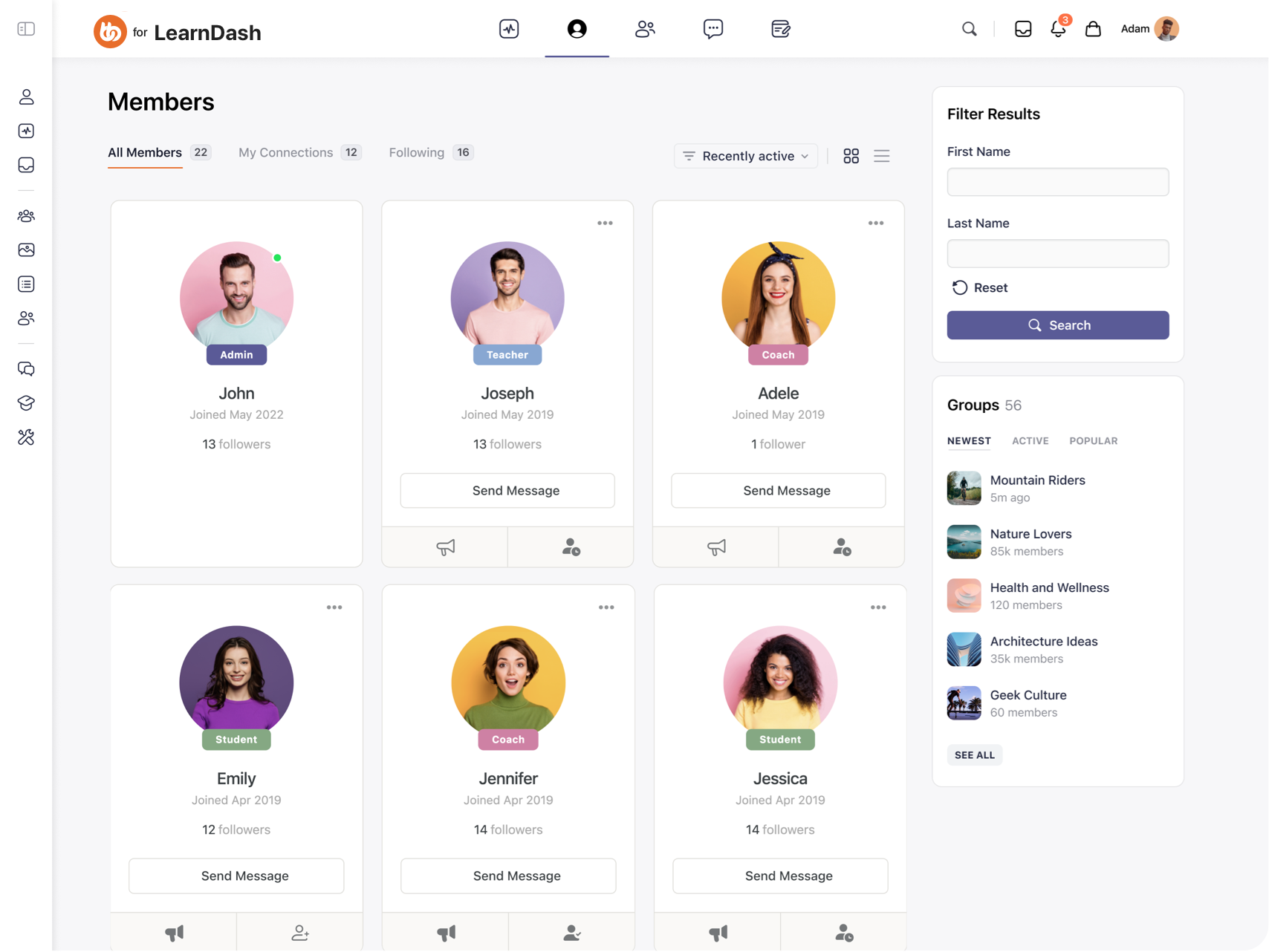
BuddyBoss’s LearnDash integration makes learning social rather than solitary. Here’s what happens automatically:
Unified access control. A member purchases a course through WooCommerce. Payment processes, LearnDash enrolment happens, and BuddyBoss group access is granted, all from one transaction.
Social learning. Each course has an associated BuddyBoss group where members discuss lessons and help each other. Peer learning happens in the course context rather than somewhere else.
Progress visibility. Member profiles display course progress, earned certificates, and achievement badges, which creates social proof and motivates other members.
Gamification connection. Combine LearnDash courses with GamiPress: award points for starting courses, badges for completion, ranks based on certifications earned.
Practical Setup Example
Create a LearnDash course called “Community Building Mastery.” Link it to a WooCommerce product priced at $297. Connect the product to a private BuddyBoss group called “Community Builders.”
Set up GamiPress to award:
- 100 points for course enrollment
- 50 points per completed lesson
- “Graduate” badge for course completion
- Access to “Expert” rank and exclusive content
Members purchase once. They gain course access, join the discussion group, earn recognition for progress, and unlock new community tiers. All of it automated.
Email & Marketing Automation: Keep Members Connected
Email is the channel that ties most of these integrations together, because it’s where automation reaches the member. Integrations make that side of it effortless.
Top Email Tools
Mailchimp is the household name: templates, automation, segmentation, and analytics in one place.
Kit covers the creator-focused end, as described in the CRM section above. If you only need one of the two, this is usually it for a content-led community.
MailPoet is WordPress-native and integrates directly with your site, so you create and send newsletters without leaving the dashboard.
What Email Integrations Deliver
Automated onboarding. New member signs up at 2am? They receive a welcome email instantly, introducing your community and guiding first steps. Weekly newsletters compile top discussions and new content automatically.
Re-engagement sequences. Member hasn’t visited in 14 days? Trigger an automated sequence:
- Day 14: “Miss anything? Here’s what’s new”
- Day 21: “We noticed you’ve been away, here’s exclusive content”
- Day 30: A direct check-in before they lapse entirely
Activity-based triggers. Sync community activity with email lists. Member completes a course? Send congratulations plus recommended next courses. Member posts their first forum question? Email community champions to welcome them.
Advanced Strategies
Behavior-based sequences. Tag members based on actions, then trigger appropriate emails:
- Downloaded free resource → 7-day educational sequence → Paid membership offer
- Attended live event → Post-event follow-up → Related content recommendations
- Upgraded to premium → VIP onboarding → Exclusive features tour
Lifecycle communication. Automate messages for milestones:
- Day 1: Welcome and orientation
- Day 7: “How’s your first week?” engagement check
- Day 30: Monthly celebration of activity
- Day 365: Anniversary acknowledgment with special offer
Winback campaigns. For cancelled members, automated sequences offer a reason to return:
- Week 1 post-cancellation: Survey asking why they left
- Week 2: Share improvements made
- Month 2: Limited-time return offer
Start with the survey. What cancelling members tell you about why they left shapes every message that follows it.
Analytics & Reporting: Understand and Optimize Growth
You can’t improve what you don’t measure. Analytics integrations turn data into decisions.
Critical Analytics Tools
Google Analytics is the foundation: page views, member behaviour flows, traffic sources, and content performance.
Metorik focuses on WooCommerce, with detailed insight into revenue, order trends, and customer behaviour.
WP Fusion connects WordPress membership sites to CRMs, tracking member behaviour, course progress, and engagement patterns.
What Analytics Integrations Reveal
Revenue metrics. Monthly recurring revenue, annual recurring revenue, member lifetime value, and churn rate. With average monthly churn sitting around 6.8% in Membership Geeks’ survey, knowing your own number is the difference between managing it and discovering it too late.
Engagement metrics. Daily and monthly active users, average session duration, and feature adoption rates. Discover which content drives engagement and what sits unused.
Conversion funnel. Track the journey from visitor to free trial to paying member, and identify where people drop off. Are they abandoning at signup? Failing to activate? Not upgrading after trials?
Cohort analysis. Compare member groups. Do annual subscribers retain better than monthly? Do members who complete onboarding engage more? Which acquisition channels produce the highest lifetime value?
Community Health Metrics: What to Track and Benchmark
The metrics that actually predict growth and churn, with benchmark ranges to compare against.
How Analytics Drive Decisions
What to create next. Which courses have the highest completion rates? What topics generate most discussion?
How to price effectively. Which tier converts best? Does offering annual options reduce churn?
When members need help. Spot at-risk members before they churn, and prioritise the stage of the journey where people are actually falling out.
Where to focus marketing. Which traffic sources produce paying members, and which produce signups that never activate?
Simple Analytics Setup
- Install Google Analytics on your site
- Set up goal tracking for signups, purchases, course completions, and milestones
- Connect WooCommerce to Metorik for revenue analytics, if you’re using it
- Link member data to your CRM for unified profiles
- Create dashboards showing MRR growth, churn rate, popular content, and lifecycle stages
- Schedule weekly reviews of key metrics and monthly cohort analyses
Why BuddyBoss Works as an Integration Hub
Most community platforms give you two options: adapt to their limited integrations, or pay for expensive proprietary tools you don’t own.
Because BuddyBoss runs on WordPress, the integrations directory lists well over a hundred tools, and the ones community owners reach for most are supported natively rather than through a connector.
What’s Native
| Category | Native | Reached via connector |
|---|---|---|
| Memberships & courses | BuddyBoss Memberships and Courses (built in) | None |
| Payments | Stripe (built in) | PayPal and others via WooCommerce or MemberPress |
| LMS platforms | LearnDash, LifterLMS, Tutor LMS | None |
| Membership plugins | MemberPress, Paid Memberships Pro, Restrict Content Pro, WishList Member | None |
| CRM & marketing | None | HubSpot, ActiveCampaign, Kit and others via WP Fusion or Zapier |
| Video & notifications | Zoom, OneSignal | Slack, Telegram, WhatsApp via Zapier or Uncanny Automator |
| Gamification | GamiPress (full suite) | None |
| Events & jobs | The Events Calendar, Modern Events Calendar, WP Job Manager | None |
| Page builders | Elementor, Beaver Builder | None |
Why Native Integration Matters
Centralized profiles. Members see purchase history, course progress, achievement badges, group memberships, and activity in one place, rather than navigating between disconnected systems.
Synchronized data. When data syncs automatically, members never face confusing discrepancies. Their membership level, course enrolments, and community access always match.
Fewer conflicts. WordPress sites often break when plugins conflict. Native integrations are tested together and updated in coordination.
Unified support. When something breaks, you contact one support team rather than refereeing between plugin developers.
Complete Member Journey Example
Here’s a full stack running end to end, for a community that has outgrown the built-in version:
- Purchase: Member buys a $497 bundle through WooCommerce
- Payment: Stripe processes the transaction
- Access: WooCommerce enrols them in LearnDash courses and BuddyBoss groups
- Welcome: Kit sends the onboarding email series
- Profile: Completing their profile earns 50 GamiPress points and a “New Member” badge
- Social learning: Course progress posts to the BuddyBoss activity feed
- Engagement: They join discussions, earning a “Contributor” badge at 10 posts
- Recognition: Course completion generates a certificate, awards a “Graduate” badge, and unlocks “Expert” access
- Upsell: Completion triggers a Kit automation offering advanced training
- Tracking: Google Analytics and Metorik record the whole journey
Worth saying plainly: you do not need all of this to start. Most of those steps are covered by the native add-on on day one. This is what the stack looks like once the business has grown into it.
Common Mistakes to Avoid
Over-integrating from day one. This is the most common and the most expensive. Start with what’s built in. Add integrations when something specific is missing, not in anticipation of needing it.
Ignoring data privacy. GDPR, CCPA, and other regulations govern how you collect and share member data. Every integration you add is another processor to account for.
Not testing the full journey. Every time you add or update integrations, buy something as a test user and confirm access unlocks and revokes correctly. Broken automation destroys trust faster than missing features.
Forgetting onboarding. Integrations improve your efficiency, but members never see backend automation. Clear onboarding is what they actually experience.
Neglecting maintenance. Plugins update, APIs change, services deprecate features. Schedule quarterly integration audits to catch problems before members do.
Skipping documentation. Write down your integration setup. When something breaks, and it will, having a map saves hours.
Start Simple, Add What You Need
The difference between a struggling membership site and a thriving one isn’t the number of tools connected to it. More often it’s the opposite: the thriving one started with less.
BuddyBoss gives you memberships, courses, community, and payments in one place from the start. When your business asks for something that isn’t there, a dedicated LMS, another payment gateway, a CRM feeding off member behaviour, the integrations are waiting and tested.
Build the simple version first. Add the next piece when a specific problem asks for it, not before.
Ready to streamline your paid community? See plans and pricing, or browse the full integrations directory.
