














Introduction
The BuddyBoss Member Blog Settings let you control how members create and publish blog posts from the front end of your BuddyBoss community. You can require administrator approval before posts are published, enable automatic draft saving, require featured images, and manage how members use categories and tags.
Tutorial Video
Access the Member Blog Settings
To access the Member Blog Settings:
- Log in to your WordPress Admin Dashboard.
- Go to BuddyBoss > Settings.
- Under BuddyBoss Add-ons, ensure Member Blogging is enabled.
- Click Settings on the Member Blogging card.
- Select Member Blogs and locate the Member Blogs section.
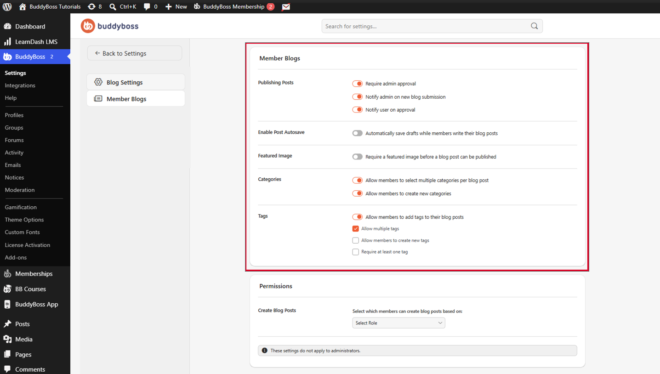
Configure Publishing Settings
- The Publishing Posts section controls how member-submitted blog posts are reviewed and published.
- Require Admin Approval – Enable Require admin approval to prevent member blog posts from being published until they have been reviewed and approved by an administrator.
- Notify Admin on New Blog Submission – Enable Notify admin on new blog submission to send an email notification whenever a member submits a blog post for review.
- Notify User on Approval – Enable Notify user on approval to automatically notify members when their submitted blog post has been approved and published.
Enable Post Autosave
Enable Automatically save drafts while members write their blog posts to periodically save drafts while members are writing, helping prevent content loss.
Require a Featured Image
Enable Require a featured image before a blog post can be published to ensure every published member blog includes a featured image.
Configure Categories
The Categories section determines how members organize their blog posts.
- Allow Multiple Categories – Enable Allow members to select multiple categories per blog post to let members assign more than one category to a blog post.
- Allow Members to Create Categories – Enable Allow members to create new categories to let members create new blog categories while publishing their posts.
Configure Tags
The Tags section controls how members organize blog posts using tags. Enable Tags Enable to allow members to add tags to their blog posts to allow members to categorize their content using tags.
The Tags options are:
- Allow Multiple Tags – Enable Allow multiple tags to let members assign multiple tags to a single blog post.
- Allow Members to Create Tags – Enable Allow members to create new tags to let members create tags that do not already exist.
- Require at Least One Tag – Enable Require at least one tag to make adding a tag mandatory before a blog post can be published.