















A common mistake when adding a membership to a course business is treating it as one more thing to sell. Within a few months the two offers are competing with each other. Course sales dip because the membership includes everything. Membership signups stall because a course costs less than a month or two of belonging.
You can sell courses and memberships together, and the combination is stronger than either alone, but only when each one has a clear job and a clear price relationship to the other. That is a strategy decision first and a software setup second.
This guide covers four ways to combine them, how to price them so they support each other, and how to set it all up on one platform. If you want the product walkthrough of BuddyBoss Memberships and Courses itself, start with this overview, then come back here for the strategy.
Why Courses and Memberships Compete With Each Other
Courses sell a finished outcome for a one-time price. Revenue is lumpy but the margin is high, and the relationship tends to end when the student reaches the last lesson. Memberships sell ongoing value: live sessions, a community, fresh resources and continued support. Revenue is predictable, but it only lasts as long as you keep delivering.
The conflict shows up in two places. If every course sits inside your membership from day one, there is little reason to buy a course on its own, and your one-time revenue drops. If your courses are priced below a month or two of membership, there is little reason to join. Fixing this means deciding how the two relate before you build anything.
Done well, they feed each other. A fitness creator might sell separate programs for strength, marathon prep and mobility, while the membership adds twice-weekly live workouts, a private accountability group and monthly challenges.
Course buyers get results from the curriculum. Members get the same curriculum plus people who keep them consistent. The courses bring in cash flow and prove your expertise, and the membership keeps students around after the course ends.
Four Ways to Combine Courses and Memberships
Pick one of these as your starting model. You can change it later, but your first choice shapes your pricing, your access rules and what you promise on the sales page.
| Model | Revenue pattern | Works best when | Main risk |
|---|---|---|---|
| Course first, membership second | One-time sale, then recurring | You have one strong flagship course | Membership offers nothing beyond the course |
| Membership as the library | Recurring only | You publish new content regularly | A stale library drives cancellations |
| Hybrid | Recurring plus one-time | You have entry-level and premium courses | The dividing line feels arbitrary |
| Rolling release | Recurring | You can ship a new course on a schedule | A schedule you cannot sustain |
1. Course First, Membership Second
The course is the front door. Someone buys it, gets a result, and when they finish you invite them into the membership for ongoing support and community. This works when one flagship course has already earned trust. It fails when the membership is just the same material on a subscription, so make sure it offers something the course does not: live access, a peer group, or new content.
2. Membership as the Library
Everything is included for a monthly or annual fee, and nothing is sold individually. This is the simplest model to explain and the best fit when community is a major draw and you add content often. The trade-off is that you give up one-time revenue entirely, and members will cancel quickly if the library stops growing.
3. Hybrid: Some Courses Included, Flagships Sold Separately
Your foundational courses come with the membership, while your highest-value programs are sold on their own or discounted for members. This protects course revenue and still gives members a reason to stay. It suits most creators. The one requirement is that the dividing line is obvious: if buyers cannot tell why one course is included and another is not, they feel nickel-and-dimed.
4. Membership With a Rolling Release
Members receive a new course or module every month or quarter, and keep access to what came before. It turns your content calendar into the reason to stay. It only works if you can keep to the schedule, so be honest about how much you can produce before you promise it.
Step-by-Step: Set Up Courses and Memberships on One Platform
Step 1: Decide What Is a Course and What Is a Membership Benefit
Use one rule: anything with a clear start and finish is a course, and anything that keeps changing is a membership benefit. Structured lessons, a curriculum and a certificate belong in a course. Live sessions, Q&A, a community, monthly challenges and an updated resource library belong in the membership. Write both lists down before you build, because they become your sales page.
Step 2: Price the Two Against Each Other
Work out how many months of membership equal the price of a course. Say a course costs $197 and the membership costs $49 a month. A member who takes that course breaks even in about four months, which makes the membership the better deal for anyone planning to take more than one course, and the course the better deal for someone who wants that one thing only. Both kinds of buyer should have an obvious option.
Those numbers are an illustration, not a benchmark. For how to set your own, see our guide to pricing an online course, and for naming and structuring the tiers themselves, see membership level ideas.
Step 3: Build the Foundation
Install BuddyBoss Platform as the hub. It gives members profiles, groups, activity feeds and messaging, so courses and memberships live inside a community instead of beside one.
If you are starting fresh, BuddyBoss Memberships and Courses is built in, so one plugin can run both sides of the model. It is available on every plan, with a small percentage fee on the Start plan and none on Launch or Scale. The current rate is always on the pricing page.
Turn memberships on first, because a course is something people are given access to. Payments run through Stripe.
If you already run LearnDash or MemberPress, keep them. BuddyBoss supports both, and Paid Memberships Pro or WooCommerce Subscriptions work for the membership side too. If you outgrow the built-in version, MemberPress is the upgrade path and also adds gateways beyond Stripe. Our guide to the top integrations for paid communities covers what to add and when.
Step 4: Set Access Rules That Match Your Model
Translate the model you chose into rules. A subscription should unlock every course it includes the moment someone joins, and revoke that access if they cancel. A single course purchase should unlock that course only.
With the native add-on, each membership tier maps to a Group, and page-level Access Protection lets you restrict any page, including profile pages and the member directory, based on the membership someone holds. An integrated plugin handles the same rules through its own subscription status.
Then test every path before launch. Buy a course as a test user. Subscribe. Upgrade, downgrade and cancel. Confirm content unlocks and locks correctly each time, because one broken access rule produces angry emails and refund requests.
Step 5: Make the Upgrade Visible
Let free visitors see that premium courses and groups exist without being able to enter them. Show locked lessons with a clear next step, keep premium group names visible, and display membership badges on profiles so status is easy to see. Seeing an active group they cannot join prompts people to ask what they are missing.
Step 6: Trigger Offers at the Right Moments
The best moment to offer a membership is the moment a course ends. When someone finishes a course, show an invitation to continue with the community and live sessions. When a member has been active for three months, offer the next tier up. When someone has not logged in for two weeks, send them the new content they missed. The ActiveCampaign integration is one way to automate those emails from member behavior.
Recognition helps renewals too. Points, badges, ranks and leaderboards are included on the Scale plan, and our gamification setup guide shows how to reward course completions and membership milestones.
Mistakes That Make Courses and Memberships Cannibalize Each Other
Putting every course in the membership at launch. You lose your one-time revenue before you know how much it was worth. Start with foundational courses inside and keep flagships separate.
Pricing the membership below your cheapest course. Nobody buys the course, and you have taught your audience that your expertise is worth less than it is.
Giving members no reason to stay after the first course. If the membership is only access to lessons, people join, finish, and cancel. The live sessions, community and new content are what carry the second and third month.
Leaving access rules unclear. Decide what happens to a course someone bought separately if they later join and then cancel, and say so on the sales page. Surprises here turn into refund requests.
Examples of Courses and Memberships Working Together
Two creators show the models above in practice. Their offers are described as they appear on their public sites.
Project Life Mastery: Courses Plus Monthly Programs
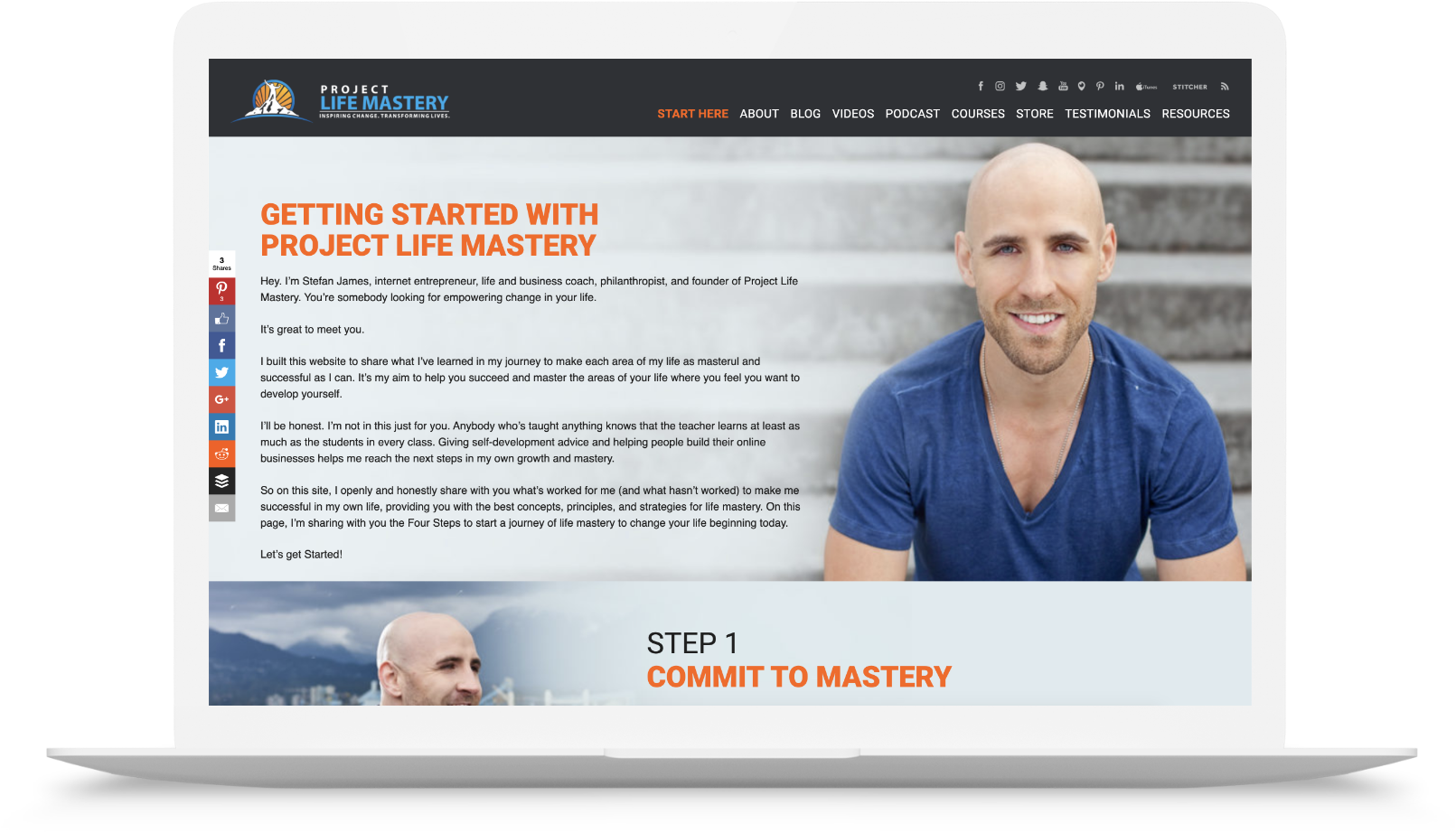
Stefan James sells standalone courses on Project Life Mastery, such as Affiliate Marketing Mastery and Mastering Book Publishing. Alongside them sit two monthly programs delivered in a live format, the Life Mastery Accelerator and the Online Business Mastery Accelerator.
A buyer can start with a single course for a specific result, then move into ongoing mentoring if they want continued guidance. That is the course-first model in practice: the course earns trust, and the recurring program holds the relationship afterward.
School of SweetGeorgia: Membership as the Library

The School of SweetGeorgia is a membership-based fiber arts school covering knitting, spinning, weaving, dyeing and crochet. Its all-access membership, billed monthly or annually, opens the full course library, and new courses and resources are added every month.
Members also get a private community with make-alongs and co-crafting sessions. The growing library plus the community is what makes it a membership rather than a catalogue of courses, and it is why the library model depends on a steady release schedule.
Frequently Asked Questions
Should I put all my courses inside my membership?
Usually not at first. Include your foundational courses so the membership has an obvious draw, and keep your highest-value programs separate or discounted for members. Once you know how much one-time revenue your flagship courses produce, you can decide whether bringing them inside is worth giving that up.
How should I price a membership next to my courses?
Divide your typical course price by your monthly membership price to see how many months of membership equal one course. If that number is very small, your courses are cheap enough that few people have a reason to join. If it is very large, the membership may look poor value to someone who only wants one course.
Aim for a gap where both options have a visible reason to be chosen, then test it. There is no universal threshold, so treat your first prices as a starting point.
When should I add a membership if I only sell courses today?
When you have people finishing your courses and asking what comes next. That is demand for ongoing support, and it is the clearest signal that a membership will sell. Launching before you have students who want more tends to produce a membership with nothing to hold onto.
What happens when a member cancels?
That is your call, and it should be written down before launch. One common approach is that access granted by the membership ends with it, while a course bought on its own stays with the buyer. Whatever you choose, state it plainly on the sales page and test it with a cancelled test account.
Do I need separate plugins to sell courses and memberships?
Not if you are starting fresh. BuddyBoss Memberships and Courses covers both in one plugin, and our overview of the add-on answers the product questions in detail. If you already use LearnDash or MemberPress, there is no need to switch.
Start With the Offer, Then the Software
The platform is the easy part. What decides whether you can sell courses and memberships together is whether each has a distinct job, whether the prices make both worth buying, and whether the access rules match what you promised.
Get those three right and the setup is the manageable part. Get them wrong and no amount of integration will stop the two offers competing.
If you are earlier in the journey, our guides to creating and selling online courses on WordPress and to monetizing a community are good places to start before you combine the two.
