














Introduction
Build Error Code E005“One or more of the images provided are using an unsupported file format” means one or more of your custom branding assets isn’t in a supported format. Follow the headings below to remove invalid assets, re-upload in the correct formats, and generate a new build.
Remove Existing Images and Icons
- In WordPress, go to BuddyBoss App > Branding > Images.
- Click Remove Image for every section: Home Screen, Login Screen, Register Screen, Launch Screen, App Icons, Android Adaptive Icon, and Android Notification Icon.
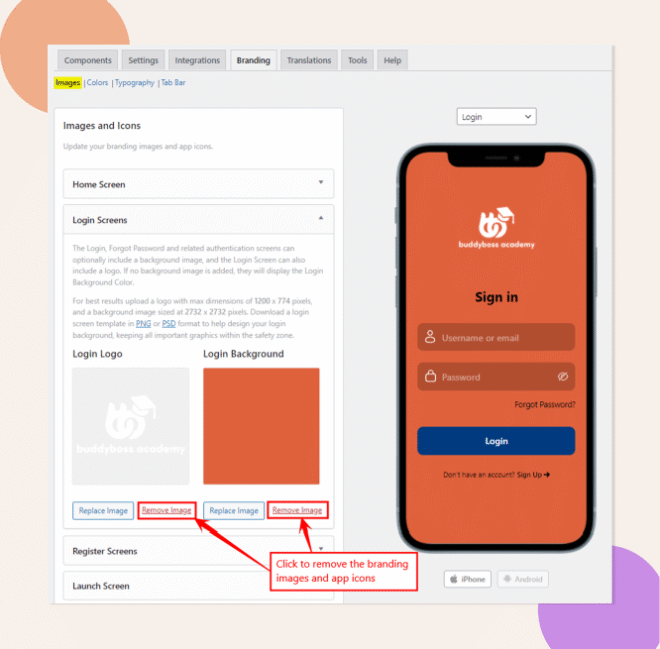
- Click Save Changes.
Re-add Supported Images
- On the same Branding > Images page, upload new images and icons saved as .PNG or .JPG that meet the required dimensions.
- Click Save Changes.
Request a New Build
- Navigate to BuddyBoss App > Build.
- In Step 2: Review Information, verify that your newly added images display correctly.
- Click Send Build Request to generate a new build with the updated assets.
Do I Need to Generate a New Build?
Yes. A new build is required so the corrected image formats are embedded in your app package.
Troubleshooting and FAQs
Q: The build log shows a different image error, what now?
A: Check the log to identify which asset failed, then remove and re-add just that image rather than all assets.
Q: Can large file sizes cause this error?
A: Yes. Keep individual images under 1 MB. If necessary, compress or optimize your images before uploading.
Q: After fixing, it still fails, how can I debug further?
A: Clear any caching plugins or server caches, then retry. If the error persists, capture the full build log and contact BuddyBoss Support with that information.