














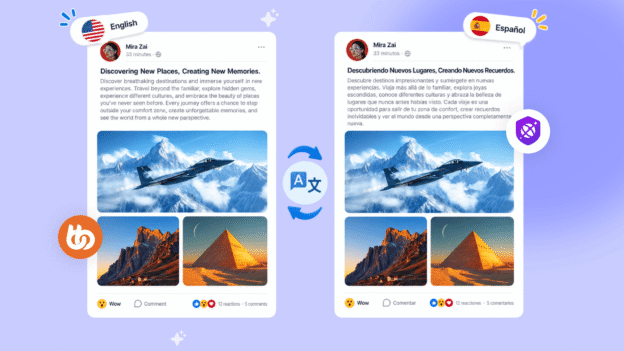
The Universally integration is live today, and it does something no multilingual setup on WordPress has managed before. It translates what your members write, not just the pages you publish.
That distinction is the entire release.
If you have ever tried to run a community in more than one language, you already know where this goes wrong.
You install a translation plugin- WPML, TranslatePress, Weglot; they all work and they all do their job well.
Your pages get translated. Your menus, your group names, your course titles, your interface strings. A Spanish member arrives to a fully Spanish experience.
Then they open the activity feed and every single post is in English.
The shell was translated. The community was not.
That is the half nobody solved, and it is the half that matters. A translated interface wrapped around an untranslated conversation is not a multilingual community. It is a multilingual login screen.
Today that changes. The Universally integration is live on the BuddyBoss Platform, and it translates what your members write.
What Universally Translation Is
Universally is a translation service and WordPress plugin covering more than 110 languages, built by the team behind WPForms, OptinMonster and All in One SEO.
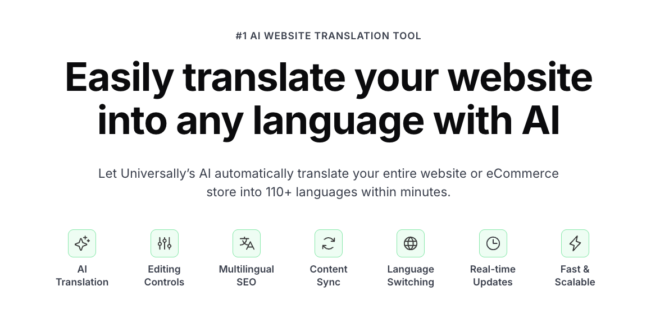
It handles the translation itself: the engine, the languages, the account and the dashboard where you manage your project.
What BuddyBoss has built is the integration. That is what connects Universally to your community and teaches it about activity feeds, groups, forums, notifications and the parts of BuddyBoss that members actually generate.
So there are two pieces here. Ours makes your community translatable. Theirs does the translating.
Why We Introduced The Universally Integration
Traditional translation plugins work at build time. They take content that already exists, translate it, store the translation, and serve it when someone requests that page. That model works beautifully for a page you published last Tuesday.
It cannot touch a comment posted four seconds ago. There is nothing to pre-translate.
Universally works at the output level instead. It translates the page as it renders, which means it does not care whether the content existed when the page was built.
A post from last year and a reply from this second go through the same path.
That is the whole difference. It is also why real-time translation of member content has been rare in community platforms, and why it is worth paying attention to now.
What Actually Gets Translated
The integration covers the parts of a community where the conversation lives.
- Activity posts and comments. The live feed, including posts made moments ago.
- Groups and forums. Group names, descriptions, forum topics and replies.
- Media titles. Photo, video and document titles, along with activity link-preview cards.
- Profile field labels. The labels members see on their own and each other’s profiles.
- Notifications, and notification emails. Alerts arrive in each member’s own language.
- Interface labels. Buttons and labels such as Like, Comment and More Options, and even time-based text like “5 minutes ago.”
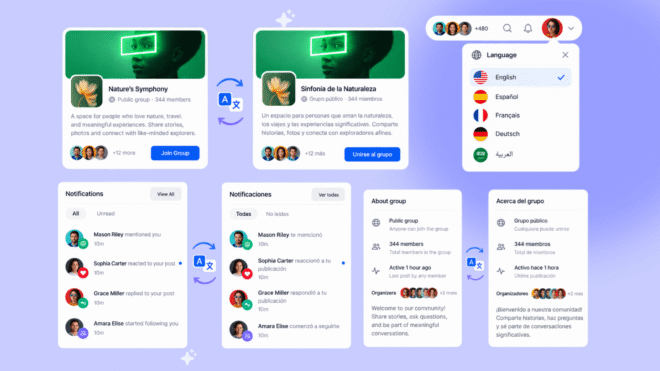
That last one sounds small and is not. Nothing breaks the illusion of a translated experience faster than a perfectly translated post sitting under an English timestamp.
The Notifications Detail
Of everything in this release, notification translation is the piece most likely to change behaviour.
Notifications are what bring members back. Somebody replied to you, somebody mentioned you, there is activity in your group. That is the mechanism that turns a website into a habit.
A notification in a language someone does not read is a notification they ignore. And a member who ignores notifications stops returning.
Universally decides which language to send in based on the member’s language switcher selection, or their WordPress profile language if they have not chosen one. So the notification arrives in the language they actually read, without you configuring anything per member.
Automatic or On Demand Translation, Your Call
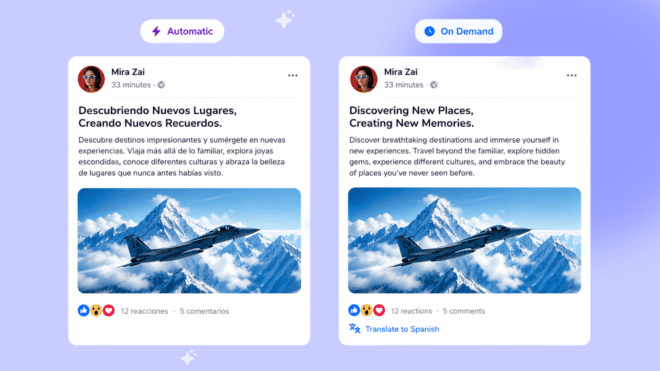
There are two ways to handle the feed, and the right answer depends on your community.
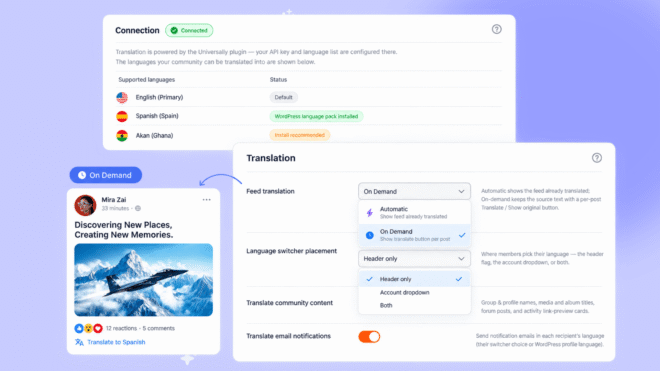
Automatic displays supported feed content already translated into the member’s selected language. They open the feed and it is simply in their language. Nothing to click.
On Demand keeps posts in their original language, with a Translate option on each one. Members translate what they want to read, and can hit Show original to go back to the source text.
Automatic is the smoother experience and the obvious default for a genuinely multilingual community. On Demand suits communities where most content is in one language and translation is the exception, or where members value seeing what was actually written.
You can change your mind later. It is a dropdown in the settings, not an architectural decision.
Both options, along with the community content and notification email toggles, live in the translation settings.
Where Members Find Their Language
The language switcher can sit in the site header, in the member’s profile dropdown, or in both. Header placement is the more discoverable option, particularly for members who have not realised translation is available yet.
Once a member picks a language, that choice is remembered across devices. They set it once on their laptop and it follows them to their phone.
You can also control how the switcher looks. Language names, country flags, flag style, and full styling on both the trigger and the dropdown, including background, text colour, borders, hover states and border radius. It should look like part of your site rather than a plugin bolted onto it.
If you want it somewhere specific, there is a shortcode, [universally_switcher], and a PHP function for custom theme placement.
Every placement and styling option is covered in the language switcher documentation.
What This Costs, and What You Need
Universally is available on the Scale plan for BuddyBoss Platform web. It is not available on Start or Launch.
This is a web release to start. App support is on the way.
It requires a Universally subscription. Universally is a third-party translation service. We built the integration; they provide the translation engine, the languages and the account. So the real cost is your Scale plan plus a Universally licence, not Scale alone.
And one thing to do before anything else. Universally ships in BuddyBoss Addons v1.1.0. Update that first, or you will not find Universally under Integrations at all.
What Does Not Change
If you already run WPML, TranslatePress or Weglot, nothing about this release breaks that.
Those plugins handle your pages, your menus, your SEO structure and your translated URL slugs. They do that well and they continue to do it. Universally addresses the part they were never built for, which is content that does not exist until a member creates it.
If you are running both, check with our support team before layering them so we can look at your specific setup. Two translation layers in the same render path is worth a conversation rather than an experiment on a live site.
Setting Up The Universally Integration on BuddyBoss Community
The full walkthrough is in the setup documentation. Here is the shape of it.
1. Create a project in the Universally dashboard
Give it your domain, a project name, your source language, and select WordPress as your technology.
2. Add your languages
For each one you choose a region if it has variants, and a URL format, either the region code, the language code, or a custom segment of two to six characters. Universally shows you a preview URL so you can see exactly how translated addresses will look. The language configuration guide covers regional variants and URL formats in full.
3. Install the plugin
Download the Universally plugin from your project, then install and activate it in WordPress.
4. Activate the integration
In your WordPress dashboard go to BuddyBoss, then Settings, then find Universally under Integrations and activate it.
5. Connect your site
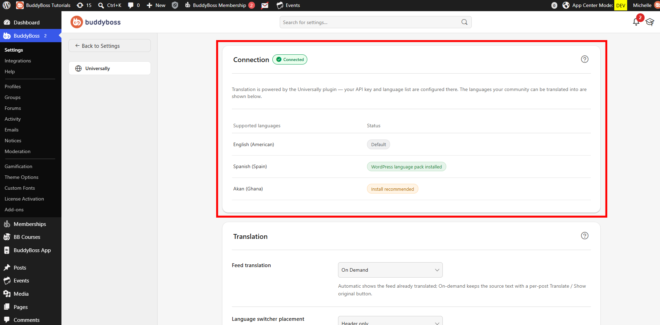
One click from the plugin handles the API key, or you can enter it manually. When it is done, the API section shows that your site is connected and the API status is Operational.
6. Configure how translation behaves
Feed translation, switcher placement, community content, notification emails.
There is no queue to work through and no strings to sit and translate.
Managing the Cache
Universally caches every unique translated string so it only ever pays to translate it once.
Universally caches every unique translated string so it only ever pays to translate it once. Under the Usage section you can see how many cached translations exist for each language.
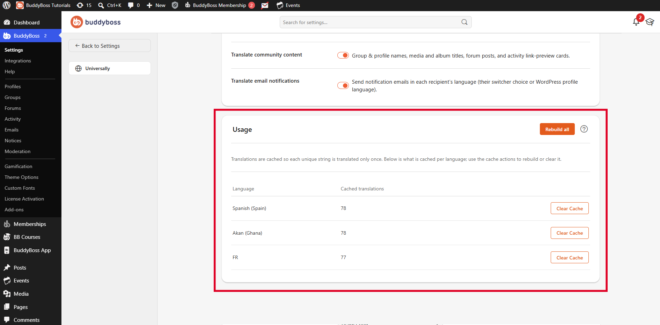
If you need to force fresh translations, you can clear the cache for a single language, or rebuild the cache across all of them. Most people will never touch this.
It matters if you have changed a glossary term, corrected a translation, or made a significant content change and want it reflected immediately.
The translation cache guide walks through both.
Browsers offer their own automatic translation, and left alone they will translate a page Universally has already translated, which produces a worse result than either would on its own.
There is a preference to stop that, covered in the translation preferences guide.
Who The Universally Integration Is Actually For
It is worth acting on today if your members already span languages and the conversation is fragmenting, if you are expanding into a new region, or if you run a community where the discussion itself is the product rather than the courses attached to it.
It is not worth it if your community is single-language and likely to stay that way. You would be paying for a translation service to solve a problem you do not have.
It is worth thinking about if you have members who read and never post. Language is one of the reasons people lurk. Somebody perfectly capable of following a conversation in their second language will often not risk writing in it.
Whether translation converts those members into participants is untested. It is the most interesting question this release opens up.
The Wider Picture
Real-time translation of member-generated content is rare at this level of the market. Circle, Mighty Networks and Skool all localise their interfaces. None of them translate what members post to each other as it happens.
That gap is not an oversight, it is an architectural problem. Translating a page is a build-time task with a cached answer. Translating a comment posted seconds ago is a render-time task that has to be fast enough that nobody notices it happening.
The trade-off is the one WordPress always offers. You get a capability the hosted platforms do not have, and in exchange you take on a third-party service, a second subscription, and another layer in your render path. That is a real trade, and worth planning for rather than discovering under load.
Common Questions on BuddyBoss Universally Integration
Which plan do I need?
Scale. Universally is not available on Start or Launch.
Do I need to buy anything else?
Yes. Universally is a separate third-party service with its own subscription. We built the integration, not the translation engine.
Does this translate what members post, or only my pages?
Both, and the member content is the point. Activity posts, comments, forum replies, group descriptions and media titles are all covered, which is what makes this different from a conventional translation plugin.
Does it work in the BuddyBoss App?
This is a web release to start, with app support on the way. Our existing app multilingual support is a separate system built around WPML.
Should I turn off WPML or TranslatePress?
Not automatically. They handle your pages, menus and SEO structure. Universally handles live member content. Talk to support before running both so we can look at your setup.
Can members choose to see the original text?
Yes, if you set feed translation to On Demand. Members translate individual posts themselves and can select Show original to return to the source.
How many languages are supported?
Universally supports over 110 languages, including full right-to-left support for Arabic, Hebrew, Persian and Urdu.
Is the translation quality good enough for a real community?
For conversational content, modern AI translation is more than adequate and reads naturally. It is not a substitute for a human translator on marketing copy, legal text or instructional material where precision genuinely matters.
Will members see the switcher if I do not add it anywhere?
You choose the placement between the header, the profile dropdown, or both. If you want it somewhere else specifically, there is a shortcode and a PHP function.
Do I need to update anything to get this?
Yes. Universally ships in BuddyBoss Addons v1.1.0, so update that first. It will not appear under Integrations until you do.
One Last Thing
For years the answer to “can BuddyBoss run a properly multilingual community?” was a qualified yes.
Yes for your pages. Not really for your conversations.
That qualification is gone.
If a language barrier was the reason your community stayed smaller than it should have, this is the release worth looking at.
